

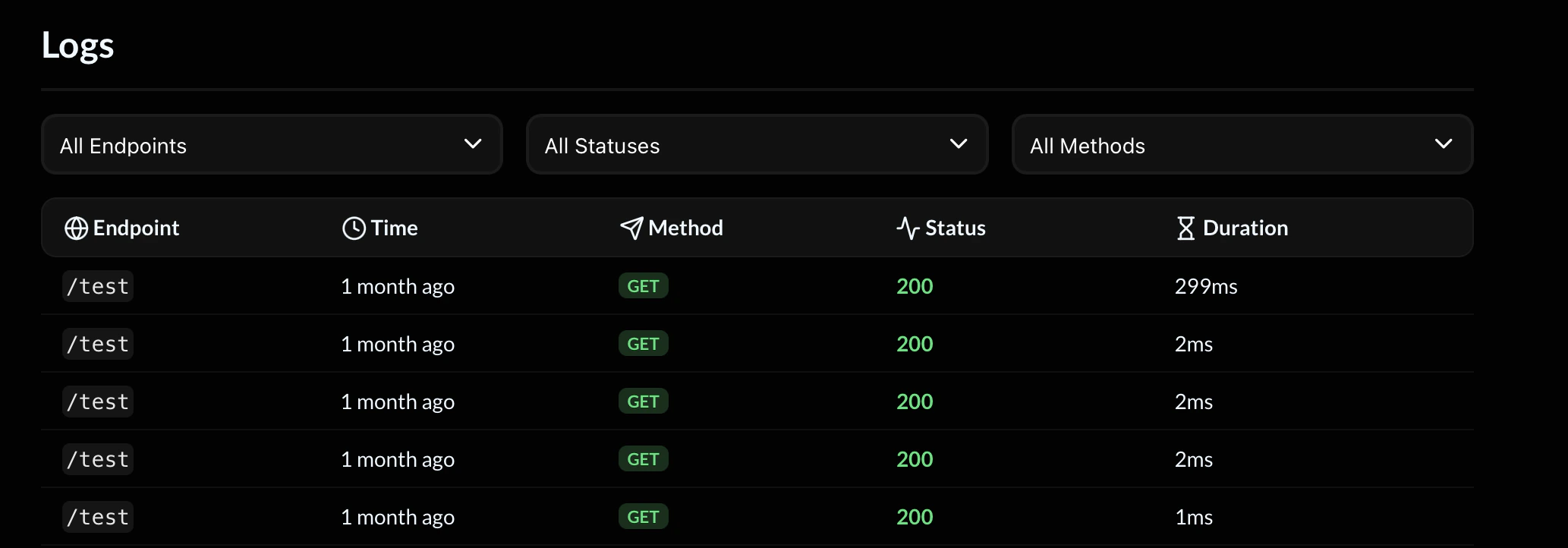
Overview
Each log entry represents a single request made to one of your endpoints. For every request, you can see:- Endpoint path
- Timestamp
- HTTP method
- Response status
- Execution duration
Filters
At the top of the page, you can filter logs by:Endpoint
Filter by a specific endpoint path to isolate activity. Example:Status
Filter by HTTP response status code. Common status codes:200→ Successful request400→ Bad request401→ Unauthorized404→ Not found500→ Internal server error
Method
Filter by HTTP method:GETPOSTPUTPATCHDELETE
Log Fields
Each row in the logs table contains the following columns:Duration
The Duration value shows how long the request took to complete.- Measured in milliseconds (ms)
- Includes the full execution of your flow
- Helpful for performance monitoring
- External API calls
- AI generation blocks
- Email sending
- Complex flow logic
Pagination
If your API receives a high volume of traffic, logs are divided into pages. Use Back and Next to navigate between pages.Debugging Workflow
When troubleshooting an issue:- Filter by the relevant endpoint
- Filter by failing status codes (e.g.,
400or500) - Review duration for performance anomalies
- Reproduce the request if needed