> ## Documentation Index
> Fetch the complete documentation index at: https://docs.avicenna.dev/llms.txt
> Use this file to discover all available pages before exploring further.
# Query Parameters
Endpoints with configured **query parameters** allow extra information included in requests to be made available in your endpoint flow through variables.
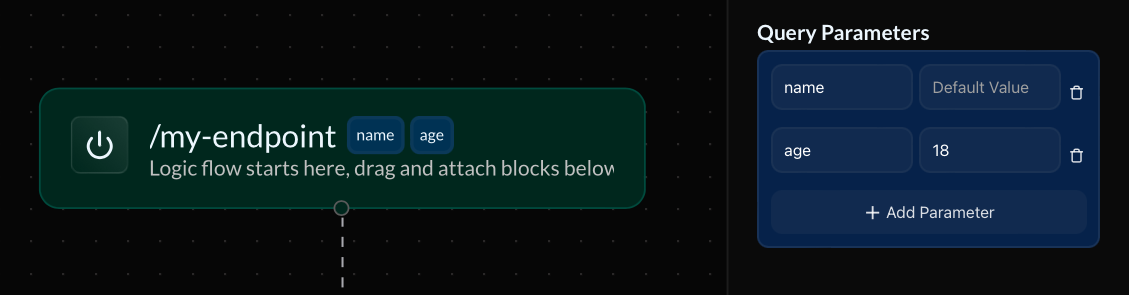 Up to 10 query parameters can be configured per endpoint. Parameters are configured in key-value pairs. Here's what an example request containing query parameters would look like:
```shellscript theme={null}
https://example.avicenna.dev/api/my-endpoint?name=Bobby&age=22
```
Query parameters included in a request that are not configured in the endpoint's workshop will be ignored.
### Key
The parameter's **key** is its required name that will correspond do the reference variable name. For example, if the key is named "name", the reference variable will be `{params.name}`.
### Default Value
The parameter's **default value** is an optional value that will be used as the its value in the event that a value is not provided in the request.
If a default value is not configured and no value is provided in the request, the parameter's reference variable will return `null`.
### Reference Variable
To reference the parameter's value in a request, use its **reference variable** anywhere within the endpoint's flow. The syntax for a query parameter's reference variable will always be `{params.KEY_NAME}` .
Up to 10 query parameters can be configured per endpoint. Parameters are configured in key-value pairs. Here's what an example request containing query parameters would look like:
```shellscript theme={null}
https://example.avicenna.dev/api/my-endpoint?name=Bobby&age=22
```
Query parameters included in a request that are not configured in the endpoint's workshop will be ignored.
### Key
The parameter's **key** is its required name that will correspond do the reference variable name. For example, if the key is named "name", the reference variable will be `{params.name}`.
### Default Value
The parameter's **default value** is an optional value that will be used as the its value in the event that a value is not provided in the request.
If a default value is not configured and no value is provided in the request, the parameter's reference variable will return `null`.
### Reference Variable
To reference the parameter's value in a request, use its **reference variable** anywhere within the endpoint's flow. The syntax for a query parameter's reference variable will always be `{params.KEY_NAME}` .